

Save wishes from any store in seconds
Add a wish! Visit any store and click the WishList button in your toolbar.
 WishList button in your toolbar.
1
Click the puzzle icon in your toolbar

2
Click the pin icon for WishList.com
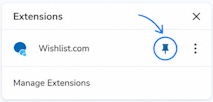
3
Click the WishList.com icon to save wishes from any store

No WishList button? Reinstall it

Saving your wish...
Getting the photo, title, and price.